


Upload images on this new platform is definitely easier than the old system.
All the images previously uploaded will still work fine in your old threads, but unfortunately we don't yet have the ability to convert them over to this new system.
So, to clarify:
I do have a hacked together way to access your old pics on the old system, here are the steps:
All the images previously uploaded will still work fine in your old threads, but unfortunately we don't yet have the ability to convert them over to this new system.
So, to clarify:
- Pictures uploaded to the old system are still live, but not integrated here for access gallery browsing.
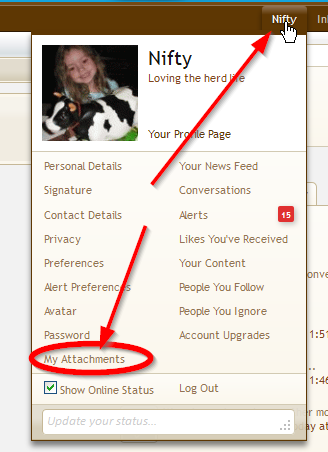
- New pictures uploaded to the new platform will be stored locally and you can access all uploaded pictures since the conversion by going hovering over your username top-right and clicking "My Attachments": http://www.theeasygarden.com/attachments/mine
I do have a hacked together way to access your old pics on the old system, here are the steps:
- Go to the backup of the old site gallery here: http://www.theeasygarden.com/forum/uploadimg_view.php?view=gallery
- If you're not logged in, use your old system login info to access that page.
- You'll be able to browse your old pics and even still link to them.
Last edited:


